
Waveshare
Not for electrically locking a means of egress.OpenApp is ingress-only software. Occupants must be able to exit without this integration, the cloud, or a phone. SeeLife safety and egress.
At a glance
Section titled “At a glance”Getting started
Section titled “Getting started”This provider type supports controlling relay channels via Switchable actions by publishing Modbus RTU binary frames over MQTT.
Provisioning (VirCom + mqtt.txt)
Section titled “Provisioning (VirCom + mqtt.txt)”OpenApp can provision supported Waveshare/ZLAN relay boards by speaking the vendor ZLAN UDP management protocol (the same protocol used by the VirCom tool).
- VirCom download: VirCom_en.rar (Waveshare)
Hardware device ID (required)
Section titled “Hardware device ID (required)”Each OpenApp Waveshare device requires a hardware device ID (hw_device_id). This is a stable, IP-independent identifier read from the board’s ZLAN status. OpenApp derives MQTT client ID and topics from it.
To obtain the HW device ID for your board:
- From the dashboard: Open the device page and use Fetch HW device ID. This sends a ZLAN query to the board (requires the board to be reachable from the backend).
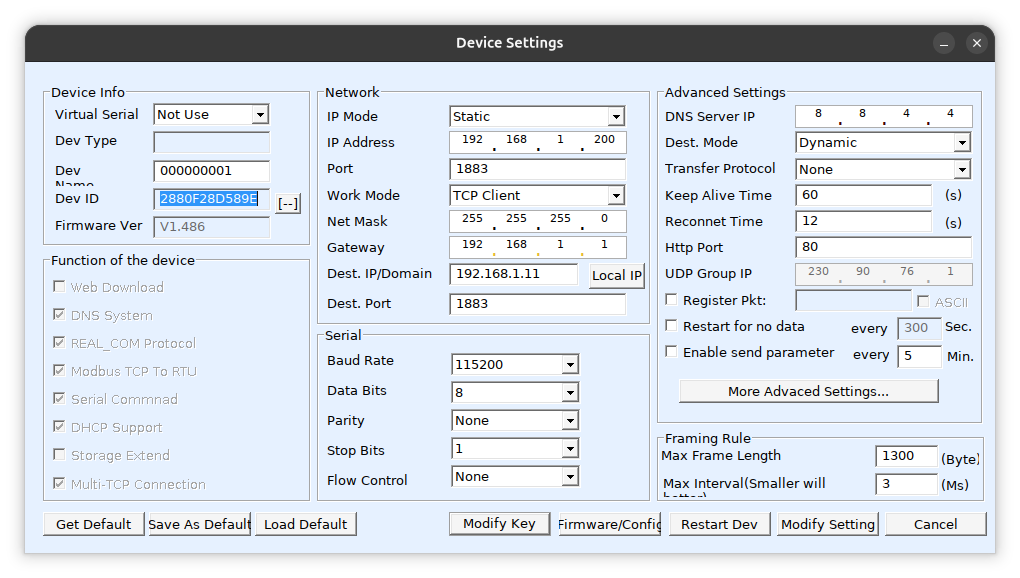
- From VirCom: Open the VirCom Device Management UI and connect to your board. In the Device Info section (top left of the device settings dialog), find the Dev ID field. Copy that value (e.g.
2880F28D589EorF28D589E) into the device’s HW device ID field in OpenApp.
In the current model:
- Broker host/port are not stored on the integration. The API uses
OPENAPP_MQTT_API_BROKER_*for relay commands; ZLAN provisioning usesOPENAPP_MQTT_DEVICE_BROKER_*for the address written to the board. The integration may store optional MQTT username/password when the broker requires them. - Each device holds board-specific identity: board host/IP and hardware device ID (required). MQTT client ID and topics are derived from the HW device ID.
- The 30 relays are modeled as switch entities under the device, with
metadata.channel_index(0..29).
Manual fallback (VirCom)
Section titled “Manual fallback (VirCom)”If the device is not reachable from OpenApp (or UDP management is blocked), you can provision manually:
- Obtain the HW device ID from VirCom (see Dev ID in the Device Info section of the device settings dialog).
- Generate a
mqtt.txtpayload (VirCom format) containing per-device topics and credentials. - In VirCom, configure the MQTT server IP/port and upload/flash
mqtt.txtto the device.
Note: OpenApp cannot perform the manual VirCom step for you; it requires the vendor UI.
Setup reference
Section titled “Setup reference”| Field | Type | Required | Description | Default | Example |
|---|---|---|---|---|---|
OPENAPP_MQTT_API_BROKER_HOST / OPENAPP_MQTT_API_BROKER_PORT | string | required | Required deployment environment variables: hostname and port the **OpenApp API** uses to publish Modbus-over-MQTT. No defaults — the process fails fast if unset. | — | your-broker.internal |
OPENAPP_MQTT_DEVICE_BROKER_HOST / OPENAPP_MQTT_DEVICE_BROKER_PORT | string | required | Required deployment environment: broker address **programmed onto boards** via ZLAN provisioning (often a LAN IP reachable from devices). Local compose uses **1883**; deployed zones use **8883**. No defaults. | — | mqtt.openapp.house:8883 |
mqtt_username | string | optional | Per-integration MQTT principal (`ws:{integration_id}`), issued on provisioning status and written to the board. Not a shared broker password. | — | ws:01ARZ3NDEKTSV4RRFFQ69G5FAV |
mqtt_password | string | optional | Password for the per-integration principal above (issued by OpenApp, not a shared env secret). | — | ******** |
Secrets
Section titled “Secrets”Waveshare does not use integration secrets.
Troubleshooting: relay toggle does nothing
Section titled “Troubleshooting: relay toggle does nothing”Relay commands are MQTT publishes from the API to the board’s subscribe topic. The board must be connected to the broker using OPENAPP_MQTT_DEVICE_BROKER_* (ZLAN programs that address). It must be an IP/hostname the board can route to on the LAN. Local compose publishes authenticated MQTT on 1883; deployed zones expose MQTTS on 8883. Do not point the board at an address only reachable from inside a container network.
API traffic uses OPENAPP_MQTT_API_BROKER_*. Device programming uses OPENAPP_MQTT_DEVICE_BROKER_*.
Verify: EMQX Dashboard → Clients (board should appear), or subscribe with an MQTT client to the Modbus topic while toggling.
Policies
Policies restrict access on top of roles — they never grant it. Browse the policy catalog for arguments and examples. Expand a category below to see the policies that apply to this integration, then expand a policy for details.
Invitations
Guest invites — duration, uses, who may create them, and which doors they can cover.
23 policies
Invitations
Guest invites — duration, uses, who may create them, and which doors they can cover.
23 policies
Invitation curfew
Blocks invitation-based opens during a forbidden time window (for example nights).
Invitation curfew
Blocks invitation-based opens during a forbidden time window (for example nights).
Admins and residents are never curfewed; existing invitations are evaluated live, not modified.
Learn more — Invitation curfew- Enforced atWhen this policy is checked: while someone tries to open, while they create or change an invitation or hold, on a membership change or background sweep (lifecycle), or after a denial (record only).
- Access-time
- TiersWhere an admin can set this policy: the whole organization, one integration, or the physical device when the connector supports a device steward.
- OrgIntegration
- DefaultWhat happens when no row of this type is configured.
- Not configured — no hour restrictions on invitation-based access.
- EnforcementEnforcement modes this type accepts. Enforce applies the row. Require approval (user sharing only) opens an admin approval inbox instead of blocking.
- Enforce
Max invitation duration
Caps how long each invitation schedule slot may last.
Max invitation duration
Caps how long each invitation schedule slot may last.
Longer create or update requests are rejected, not shortened.
Learn more — Max invitation duration- Enforced atWhen this policy is checked: while someone tries to open, while they create or change an invitation or hold, on a membership change or background sweep (lifecycle), or after a denial (record only).
- Authoring-time
- TiersWhere an admin can set this policy: the whole organization, one integration, or the physical device when the connector supports a device steward.
- OrgIntegration
- DefaultWhat happens when no row of this type is configured.
- Not configured — no policy cap on invitation slot length.
- EnforcementEnforcement modes this type accepts. Enforce applies the row. Require approval (user sharing only) opens an admin approval inbox instead of blocking.
- Enforce
Max share duration
Caps how long a short-term share (TTL invitation) may last.
Max share duration
Caps how long a short-term share (TTL invitation) may last.
Combined with max invitation duration as the stricter of the two. Longer create requests are rejected, not shortened.
Learn more — Max share duration- Enforced at
- Authoring-time
- Tiers
- OrgIntegration
- Default
- System default is 86400 (1 day) when unset. Org policy may raise the share cap up to 31536000 (365d).
- Enforcement
- Enforce
Default share uses
When the author omits a use count on a share, store this default.
Default share uses
When the author omits a use count on a share, store this default.
The system default is 1 when this policy is not configured.
Learn more — Default share uses- Enforced at
- Authoring-time
- Tiers
- OrgIntegration
- Default
- Not configured — omitted share max_uses stores 1.
- Enforcement
- Enforce
Max share uses
Ceiling on how many times a share may be used.
Max share uses
Ceiling on how many times a share may be used.
Unlimited shares require allow_unlimited on every applicable row and no invitation_max_uses.
Learn more — Max share uses- Enforced at
- Authoring-time
- Tiers
- OrgIntegration
- Default
- Not configured — no extra ceiling; unlimited shares remain forbidden.
- Enforcement
- Enforce
Max invitation uses
Requires a finite use count and rejects unlimited invitations or counts above the cap.
Max invitation uses
Requires a finite use count and rejects unlimited invitations or counts above the cap.
- Enforced atWhen this policy is checked: while someone tries to open, while they create or change an invitation or hold, on a membership change or background sweep (lifecycle), or after a denial (record only).
- Authoring-time
- TiersWhere an admin can set this policy: the whole organization, one integration, or the physical device when the connector supports a device steward.
- OrgIntegration
- DefaultWhat happens when no row of this type is configured.
- Not configured — unlimited-use invitations are allowed.
- EnforcementEnforcement modes this type accepts. Enforce applies the row. Require approval (user sharing only) opens an admin approval inbox instead of blocking.
- Enforce
Max invitation devices
Caps the number of unique guest browsers or app installations that may register an invitation.
Max invitation devices
Caps the number of unique guest browsers or app installations that may register an invitation.
- Enforced atWhen this policy is checked: while someone tries to open, while they create or change an invitation or hold, on a membership change or background sweep (lifecycle), or after a denial (record only).
- Authoring-time
- TiersWhere an admin can set this policy: the whole organization, one integration, or the physical device when the connector supports a device steward.
- OrgIntegration
- DefaultWhat happens when no row of this type is configured.
- Not configured — invitations may register any number of devices.
- EnforcementEnforcement modes this type accepts. Enforce applies the row. Require approval (user sharing only) opens an admin approval inbox instead of blocking.
- Enforce
Max active invitations per user
Caps how many enabled, unexpired invitations one person may have at once.
Max active invitations per user
Caps how many enabled, unexpired invitations one person may have at once.
- Enforced atWhen this policy is checked: while someone tries to open, while they create or change an invitation or hold, on a membership change or background sweep (lifecycle), or after a denial (record only).
- Authoring-time
- TiersWhere an admin can set this policy: the whole organization, one integration, or the physical device when the connector supports a device steward.
- OrgIntegration
- DefaultWhat happens when no row of this type is configured.
- Not configured — no cap on how many invitations one person may keep active.
- EnforcementEnforcement modes this type accepts. Enforce applies the row. Require approval (user sharing only) opens an admin approval inbox instead of blocking.
- Enforce
Require invitation expiry
Forbids open-ended recurring invitations that never end.
Require invitation expiry
Forbids open-ended recurring invitations that never end.
- Enforced atWhen this policy is checked: while someone tries to open, while they create or change an invitation or hold, on a membership change or background sweep (lifecycle), or after a denial (record only).
- Authoring-time
- TiersWhere an admin can set this policy: the whole organization, one integration, or the physical device when the connector supports a device steward.
- OrgIntegration
- DefaultWhat happens when no row of this type is configured.
- Not configured — never-ending recurring invitations are allowed.
- EnforcementEnforcement modes this type accepts. Enforce applies the row. Require approval (user sharing only) opens an admin approval inbox instead of blocking.
- Enforce
Allowed entry kinds
Limits which portal types (door, gate, boom-gate) an invitation may grant.
Allowed entry kinds
Limits which portal types (door, gate, boom-gate) an invitation may grant.
Combination intersects allowed sets.
Learn more — Allowed entry kinds- Enforced atWhen this policy is checked: while someone tries to open, while they create or change an invitation or hold, on a membership change or background sweep (lifecycle), or after a denial (record only).
- Authoring-time
- TiersWhere an admin can set this policy: the whole organization, one integration, or the physical device when the connector supports a device steward.
- OrgIntegration
- DefaultWhat happens when no row of this type is configured.
- Not configured — any portal entry kind may be granted.
- EnforcementEnforcement modes this type accepts. Enforce applies the row. Require approval (user sharing only) opens an admin approval inbox instead of blocking.
- Enforce
Require invitation justification
Requires a non-empty creation justification when creating or updating an invitation.
Require invitation justification
Requires a non-empty creation justification when creating or updating an invitation.
- Enforced atWhen this policy is checked: while someone tries to open, while they create or change an invitation or hold, on a membership change or background sweep (lifecycle), or after a denial (record only).
- Authoring-time
- TiersWhere an admin can set this policy: the whole organization, one integration, or the physical device when the connector supports a device steward.
- OrgIntegration
- DefaultWhat happens when no row of this type is configured.
- Not configured — justification is optional.
- EnforcementEnforcement modes this type accepts. Enforce applies the row. Require approval (user sharing only) opens an admin approval inbox instead of blocking.
- Enforce
Max doors per invitation
Caps how many unique portals a single invitation may grant.
Max doors per invitation
Caps how many unique portals a single invitation may grant.
- Enforced atWhen this policy is checked: while someone tries to open, while they create or change an invitation or hold, on a membership change or background sweep (lifecycle), or after a denial (record only).
- Authoring-time
- TiersWhere an admin can set this policy: the whole organization, one integration, or the physical device when the connector supports a device steward.
- OrgIntegration
- DefaultWhat happens when no row of this type is configured.
- Not configured — no policy cap on portals per invitation.
- EnforcementEnforcement modes this type accepts. Enforce applies the row. Require approval (user sharing only) opens an admin approval inbox instead of blocking.
- Enforce
Own-listing doors only
Invitations may only grant doors the author can open as a member of an allowed listing.
Own-listing doors only
Invitations may only grant doors the author can open as a member of an allowed listing.
Org/integration admins are exempt unless applies_to says otherwise. PalGate-only sites with no listings fail for members.
Learn more — Own-listing doors only- Enforced atWhen this policy is checked: while someone tries to open, while they create or change an invitation or hold, on a membership change or background sweep (lifecycle), or after a denial (record only).
- Authoring-time
- TiersWhere an admin can set this policy: the whole organization, one integration, or the physical device when the connector supports a device steward.
- OrgIntegration
- DefaultWhat happens when no row of this type is configured.
- Not configured — invitations may grant any portal the author can otherwise share.
- EnforcementEnforcement modes this type accepts. Enforce applies the row. Require approval (user sharing only) opens an admin approval inbox instead of blocking.
- Enforce
Prohibit master-door invitations
Rejects an invitation if any granted portal’s door is a listed OpenApp device id (union of ids; never client-forged hardware ids).
Prohibit master-door invitations
Rejects an invitation if any granted portal’s door is a listed OpenApp device id (union of ids; never client-forged hardware ids).
- Enforced atWhen this policy is checked: while someone tries to open, while they create or change an invitation or hold, on a membership change or background sweep (lifecycle), or after a denial (record only).
- Authoring-time
- TiersWhere an admin can set this policy: the whole organization, one integration, or the physical device when the connector supports a device steward.
- OrgIntegration
- DefaultWhat happens when no row of this type is configured.
- Not configured — master doors may be granted on invitations.
- EnforcementEnforcement modes this type accepts. Enforce applies the row. Require approval (user sharing only) opens an admin approval inbox instead of blocking.
- Enforce
Who may invite
Literal allow-list of roles that may create invitations.
Who may invite
Literal allow-list of roles that may create invitations.
Combination intersects lists; empty intersection means nobody. Not admin-exempt. Compose with user_sharing (both must pass).
Learn more — Who may invite- Enforced atWhen this policy is checked: while someone tries to open, while they create or change an invitation or hold, on a membership change or background sweep (lifecycle), or after a denial (record only).
- Authoring-time
- TiersWhere an admin can set this policy: the whole organization, one integration, or the physical device when the connector supports a device steward.
- OrgIntegration
- DefaultWhat happens when no row of this type is configured.
- Not configured — anyone who can otherwise create invitations may do so.
- EnforcementEnforcement modes this type accepts. Enforce applies the row. Require approval (user sharing only) opens an admin approval inbox instead of blocking.
- Enforce
No invitation re-share
Listing residents cannot create or update invitations.
No invitation re-share
Listing residents cannot create or update invitations.
Org and integration rows bind residents by default, not generic members or admins. Device-tier rows bind everyone.
Learn more — No invitation re-share- Enforced at
- Authoring-time
- Tiers
- OrgIntegration
- Default
- Not configured — invitees may create further invitations if their roles allow it.
- Enforcement
- Enforce
Require invitation identity
Requires a host PIN, a host-attached photo, and/or a verified invitee phone before an invitation can be created or used.
Require invitation identity
Requires a host PIN, a host-attached photo, and/or a verified invitee phone before an invitation can be created or used.
- Enforced atWhen this policy is checked: while someone tries to open, while they create or change an invitation or hold, on a membership change or background sweep (lifecycle), or after a denial (record only).
- Authoring-time
- TiersWhere an admin can set this policy: the whole organization, one integration, or the physical device when the connector supports a device steward.
- OrgIntegration
- DefaultWhat happens when no row of this type is configured.
- Not configured — PIN, photo, and verified phone are optional.
- EnforcementEnforcement modes this type accepts. Enforce applies the row. Require approval (user sharing only) opens an admin approval inbox instead of blocking.
- Enforce
Invitation allowed days
Limits invitation-based opens to listed weekdays, minus blackout dates and optional holiday-calendar dates.
Invitation allowed days
Limits invitation-based opens to listed weekdays, minus blackout dates and optional holiday-calendar dates.
Existing invitations are evaluated live, not modified.
Learn more — Invitation allowed days- Enforced atWhen this policy is checked: while someone tries to open, while they create or change an invitation or hold, on a membership change or background sweep (lifecycle), or after a denial (record only).
- Access-time
- TiersWhere an admin can set this policy: the whole organization, one integration, or the physical device when the connector supports a device steward.
- OrgIntegration
- DefaultWhat happens when no row of this type is configured.
- Not configured — invitation-based access is not limited by weekday or blackout date.
- EnforcementEnforcement modes this type accepts. Enforce applies the row. Require approval (user sharing only) opens an admin approval inbox instead of blocking.
- Enforce
Holiday calendar
Lists organization-local ISO dates that invitation allowed-days can treat as holidays.
Holiday calendar
Lists organization-local ISO dates that invitation allowed-days can treat as holidays.
This type does not deny access by itself.
Learn more — Holiday calendar- Enforced atWhen this policy is checked: while someone tries to open, while they create or change an invitation or hold, on a membership change or background sweep (lifecycle), or after a denial (record only).
- Access-time
- TiersWhere an admin can set this policy: the whole organization, one integration, or the physical device when the connector supports a device steward.
- OrgIntegration
- DefaultWhat happens when no row of this type is configured.
- Not configured — no shared holiday date list.
- EnforcementEnforcement modes this type accepts. Enforce applies the row. Require approval (user sharing only) opens an admin approval inbox instead of blocking.
- Enforce
Require named invitations
Forbids invitations that anyone with the link may use, so every invitation must name who it is for.
Require named invitations
Forbids invitations that anyone with the link may use, so every invitation must name who it is for.
- Enforced atWhen this policy is checked: while someone tries to open, while they create or change an invitation or hold, on a membership change or background sweep (lifecycle), or after a denial (record only).
- Authoring-time
- TiersWhere an admin can set this policy: the whole organization, one integration, or the physical device when the connector supports a device steward.
- OrgIntegration
- DefaultWhat happens when no row of this type is configured.
- Not configured — invitations default to anyone_with_link, which is the historical behaviour.
- EnforcementEnforcement modes this type accepts. Enforce applies the row. Require approval (user sharing only) opens an admin approval inbox instead of blocking.
- Enforce
Allowed invitation contact kinds
Restricts which kinds of contact an invitation may name: organization people, groups, email, or phone.
Allowed invitation contact kinds
Restricts which kinds of contact an invitation may name: organization people, groups, email, or phone.
- Enforced atWhen this policy is checked: while someone tries to open, while they create or change an invitation or hold, on a membership change or background sweep (lifecycle), or after a denial (record only).
- Authoring-time
- TiersWhere an admin can set this policy: the whole organization, one integration, or the physical device when the connector supports a device steward.
- OrgIntegration
- DefaultWhat happens when no row of this type is configured.
- Not configured — all four contact kinds are allowed.
- EnforcementEnforcement modes this type accepts. Enforce applies the row. Require approval (user sharing only) opens an admin approval inbox instead of blocking.
- Enforce
Max contacts per invitation
Caps how many contacts one invitation may name.
Max contacts per invitation
Caps how many contacts one invitation may name.
- Enforced atWhen this policy is checked: while someone tries to open, while they create or change an invitation or hold, on a membership change or background sweep (lifecycle), or after a denial (record only).
- Authoring-time
- TiersWhere an admin can set this policy: the whole organization, one integration, or the physical device when the connector supports a device steward.
- OrgIntegration
- DefaultWhat happens when no row of this type is configured.
- Not configured — no cap on the number of contacts.
- EnforcementEnforcement modes this type accepts. Enforce applies the row. Require approval (user sharing only) opens an admin approval inbox instead of blocking.
- Enforce
Max notifications per contact per day
Caps how many times one invitation contact may be notified in a UTC day.
Max notifications per contact per day
Caps how many times one invitation contact may be notified in a UTC day.
- Enforced atWhen this policy is checked: while someone tries to open, while they create or change an invitation or hold, on a membership change or background sweep (lifecycle), or after a denial (record only).
- Authoring-time
- TiersWhere an admin can set this policy: the whole organization, one integration, or the physical device when the connector supports a device steward.
- OrgIntegration
- DefaultWhat happens when no row of this type is configured.
- Not configured — no daily cap on notifications to one contact.
- EnforcementEnforcement modes this type accepts. Enforce applies the row. Require approval (user sharing only) opens an admin approval inbox instead of blocking.
- Enforce
Holds
Door hold-open and hold-closed — who may set a hold and for how long.
5 policies
Holds
Door hold-open and hold-closed — who may set a hold and for how long.
5 policies
Require hold expiry
Members and residents cannot set a permanent hold.
Require hold expiry
Members and residents cannot set a permanent hold.
Temporary (and unless also forbidden, weekly) holds are still allowed.
Learn more — Require hold expiry- Enforced atWhen this policy is checked: while someone tries to open, while they create or change an invitation or hold, on a membership change or background sweep (lifecycle), or after a denial (record only).
- Authoring-time
- TiersWhere an admin can set this policy: the whole organization, one integration, or the physical device when the connector supports a device steward.
- OrgIntegration
- DefaultWhat happens when no row of this type is configured.
- Not configured — permanent holds are allowed for anyone with the set-hold role.
- EnforcementEnforcement modes this type accepts. Enforce applies the row. Require approval (user sharing only) opens an admin approval inbox instead of blocking.
- Enforce
Max hold duration
Caps how long a temporary hold can last.
Max hold duration
Caps how long a temporary hold can last.
Longer requests are rejected, not shortened. PalGate hardware latch max is an extra cap when present.
Learn more — Max hold duration- Enforced atWhen this policy is checked: while someone tries to open, while they create or change an invitation or hold, on a membership change or background sweep (lifecycle), or after a denial (record only).
- Authoring-time
- TiersWhere an admin can set this policy: the whole organization, one integration, or the physical device when the connector supports a device steward.
- OrgIntegration
- DefaultWhat happens when no row of this type is configured.
- Not configured — no policy cap on temporary hold duration.
- EnforcementEnforcement modes this type accepts. Enforce applies the row. Require approval (user sharing only) opens an admin approval inbox instead of blocking.
- Enforce
No repeating holds
Members and residents may only set a one-shot hold, not a repeating calendar schedule.
No repeating holds
Members and residents may only set a one-shot hold, not a repeating calendar schedule.
- Enforced atWhen this policy is checked: while someone tries to open, while they create or change an invitation or hold, on a membership change or background sweep (lifecycle), or after a denial (record only).
- Authoring-time
- TiersWhere an admin can set this policy: the whole organization, one integration, or the physical device when the connector supports a device steward.
- OrgIntegration
- DefaultWhat happens when no row of this type is configured.
- Not configured — repeating holds are allowed for anyone with set-hold.
- EnforcementEnforcement modes this type accepts. Enforce applies the row. Require approval (user sharing only) opens an admin approval inbox instead of blocking.
- Enforce
Allowed hold modes
Limits members and residents to hold-open, hold-closed, or both (for example, stay-off for lights but not stay-on).
Allowed hold modes
Limits members and residents to hold-open, hold-closed, or both (for example, stay-off for lights but not stay-on).
- Enforced atWhen this policy is checked: while someone tries to open, while they create or change an invitation or hold, on a membership change or background sweep (lifecycle), or after a denial (record only).
- Authoring-time
- TiersWhere an admin can set this policy: the whole organization, one integration, or the physical device when the connector supports a device steward.
- OrgIntegration
- DefaultWhat happens when no row of this type is configured.
- Not configured — both hold-open and hold-closed are allowed.
- EnforcementEnforcement modes this type accepts. Enforce applies the row. Require approval (user sharing only) opens an admin approval inbox instead of blocking.
- Enforce
No holds
Members and residents cannot set a hold, even if an admin granted the set-hold role.
No holds
Members and residents cannot set a hold, even if an admin granted the set-hold role.
Device-tier without applies_to binds everyone, including admins.
Learn more — No holds- Enforced atWhen this policy is checked: while someone tries to open, while they create or change an invitation or hold, on a membership change or background sweep (lifecycle), or after a denial (record only).
- Authoring-time
- TiersWhere an admin can set this policy: the whole organization, one integration, or the physical device when the connector supports a device steward.
- OrgIntegration
- DefaultWhat happens when no row of this type is configured.
- Not configured — anyone with the set-hold role may set a hold.
- EnforcementEnforcement modes this type accepts. Enforce applies the row. Require approval (user sharing only) opens an admin approval inbox instead of blocking.
- Enforce
Sharing
Who may share access or manage linked users outside invitations.
4 policies
Sharing
Who may share access or manage linked users outside invitations.
4 policies
User sharing control
Restricts whether non-admins may share access or create invitations out of band — block outright or require admin approval.
User sharing control
Restricts whether non-admins may share access or create invitations out of band — block outright or require admin approval.
- Enforced atWhen this policy is checked: while someone tries to open, while they create or change an invitation or hold, on a membership change or background sweep (lifecycle), or after a denial (record only).
- Authoring-time
- TiersWhere an admin can set this policy: the whole organization, one integration, or the physical device when the connector supports a device steward.
- OrgIntegration
- DefaultWhat happens when no row of this type is configured.
- Not configured — non-admins may share access freely.
- EnforcementEnforcement modes this type accepts. Enforce applies the row. Require approval (user sharing only) opens an admin approval inbox instead of blocking.
- EnforceRequire approval
No transitive delegation
Invite create: org admin or listing admin only.
No transitive delegation
Invite create: org admin or listing admin only.
Vendor users_admin writes (except list): org admin only. Runs in addition to user_sharing.
Learn more — No transitive delegation- Enforced atWhen this policy is checked: while someone tries to open, while they create or change an invitation or hold, on a membership change or background sweep (lifecycle), or after a denial (record only).
- Authoring-time
- TiersWhere an admin can set this policy: the whole organization, one integration, or the physical device when the connector supports a device steward.
- OrgIntegration
- DefaultWhat happens when no row of this type is configured.
- Not configured — ordinary role and user_sharing rules apply.
- EnforcementEnforcement modes this type accepts. Enforce applies the row. Require approval (user sharing only) opens an admin approval inbox instead of blocking.
- Enforce
Approval threshold
Requires N distinct organization-admin approve votes before a pending policy approval proceeds.
Approval threshold
Requires N distinct organization-admin approve votes before a pending policy approval proceeds.
Any deny denies. Self-approval does not count.
Learn more — Approval threshold- Enforced atWhen this policy is checked: while someone tries to open, while they create or change an invitation or hold, on a membership change or background sweep (lifecycle), or after a denial (record only).
- Authoring-time
- TiersWhere an admin can set this policy: the whole organization, one integration, or the physical device when the connector supports a device steward.
- OrgIntegration
- DefaultWhat happens when no row of this type is configured.
- Not configured — a single admin approve or deny is enough.
- EnforcementEnforcement modes this type accepts. Enforce applies the row. Require approval (user sharing only) opens an admin approval inbox instead of blocking.
- Enforce
Agent group write
Lets this organization’s agents manage groups: create, edit and delete them, change members, and decide links and admissions.
Agent group write
Lets this organization’s agents manage groups: create, edit and delete them, change members, and decide links and admissions.
- Enforced atWhen this policy is checked: while someone tries to open, while they create or change an invitation or hold, on a membership change or background sweep (lifecycle), or after a denial (record only).
- Access-time
- TiersWhere an admin can set this policy: the whole organization, one integration, or the physical device when the connector supports a device steward.
- Org
- DefaultWhat happens when no row of this type is configured.
- Not configured — agents cannot reach group routes.
- EnforcementEnforcement modes this type accepts. Enforce applies the row. Require approval (user sharing only) opens an admin approval inbox instead of blocking.
- Enforce
Lifecycle
Move-out and idle membership — revoke leftover invites without deleting the user.
2 policies
Lifecycle
Move-out and idle membership — revoke leftover invites without deleting the user.
2 policies
Revoke invites on move-out
When a resident is removed from a listing, enabled invitations they authored that grant that listing’s doors are revoked.
Revoke invites on move-out
When a resident is removed from a listing, enabled invitations they authored that grant that listing’s doors are revoked.
- Enforced atWhen this policy is checked: while someone tries to open, while they create or change an invitation or hold, on a membership change or background sweep (lifecycle), or after a denial (record only).
- Lifecycle
- TiersWhere an admin can set this policy: the whole organization, one integration, or the physical device when the connector supports a device steward.
- OrgIntegration
- DefaultWhat happens when no row of this type is configured.
- Not configured — leftover invitations stay enabled after move-out.
- EnforcementEnforcement modes this type accepts. Enforce applies the row. Require approval (user sharing only) opens an admin approval inbox instead of blocking.
- Enforce
Expire dormant users
After idle days, a background sweep revokes that person’s invitations and removes residencies.
Expire dormant users
After idle days, a background sweep revokes that person’s invitations and removes residencies.
The user account is not deleted. Admins are exempt unless included.
Learn more — Expire dormant users- Enforced atWhen this policy is checked: while someone tries to open, while they create or change an invitation or hold, on a membership change or background sweep (lifecycle), or after a denial (record only).
- Lifecycle
- TiersWhere an admin can set this policy: the whole organization, one integration, or the physical device when the connector supports a device steward.
- OrgIntegration
- DefaultWhat happens when no row of this type is configured.
- Not configured — idle members and residents are not auto-expired.
- EnforcementEnforcement modes this type accepts. Enforce applies the row. Require approval (user sharing only) opens an admin approval inbox instead of blocking.
- Enforce
Agent safety
Time windows, throttles, and extra confirmation for agents, API keys, and guests.
4 policies
Agent safety
Time windows, throttles, and extra confirmation for agents, API keys, and guests.
4 policies
Quiet hours
Blocks access during a local hour window for listed principal kinds (agents, API keys, invitations).
Quiet hours
Blocks access during a local hour window for listed principal kinds (agents, API keys, invitations).
Admins are not restricted unless included.
Learn more — Quiet hours- Enforced atWhen this policy is checked: while someone tries to open, while they create or change an invitation or hold, on a membership change or background sweep (lifecycle), or after a denial (record only).
- Access-time
- TiersWhere an admin can set this policy: the whole organization, one integration, or the physical device when the connector supports a device steward.
- OrgIntegration
- DefaultWhat happens when no row of this type is configured.
- Not configured — no quiet-hours window.
- EnforcementEnforcement modes this type accepts. Enforce applies the row. Require approval (user sharing only) opens an admin approval inbox instead of blocking.
- Enforce
Rate limit
Throttles entity opens per principal in a sliding window so retrying agents cannot exhaust door quota.
Rate limit
Throttles entity opens per principal in a sliding window so retrying agents cannot exhaust door quota.
- Enforced atWhen this policy is checked: while someone tries to open, while they create or change an invitation or hold, on a membership change or background sweep (lifecycle), or after a denial (record only).
- Access-time
- TiersWhere an admin can set this policy: the whole organization, one integration, or the physical device when the connector supports a device steward.
- OrgIntegration
- DefaultWhat happens when no row of this type is configured.
- Not configured — no policy throttle on opens.
- EnforcementEnforcement modes this type accepts. Enforce applies the row. Require approval (user sharing only) opens an admin approval inbox instead of blocking.
- Enforce
Require step-up
Requires extra confirmation before a physical write for the listed principal kinds.
Require step-up
Requires extra confirmation before a physical write for the listed principal kinds.
- Enforced atWhen this policy is checked: while someone tries to open, while they create or change an invitation or hold, on a membership change or background sweep (lifecycle), or after a denial (record only).
- Access-time
- TiersWhere an admin can set this policy: the whole organization, one integration, or the physical device when the connector supports a device steward.
- OrgIntegration
- DefaultWhat happens when no row of this type is configured.
- Not configured — no extra confirmation beyond ordinary authorization.
- EnforcementEnforcement modes this type accepts. Enforce applies the row. Require approval (user sharing only) opens an admin approval inbox instead of blocking.
- Enforce
Anti-tailgating cooldown
After a successful open of an entity, further opens of that entity are denied until the cooldown elapses.
Anti-tailgating cooldown
After a successful open of an entity, further opens of that entity are denied until the cooldown elapses.
Admins are exempt by default.
Learn more — Anti-tailgating cooldown- Enforced atWhen this policy is checked: while someone tries to open, while they create or change an invitation or hold, on a membership change or background sweep (lifecycle), or after a denial (record only).
- Access-time
- TiersWhere an admin can set this policy: the whole organization, one integration, or the physical device when the connector supports a device steward.
- OrgIntegration
- DefaultWhat happens when no row of this type is configured.
- Not configured — no per-door cooldown after a successful open.
- EnforcementEnforcement modes this type accepts. Enforce applies the row. Require approval (user sharing only) opens an admin approval inbox instead of blocking.
- Enforce
Operational
Site-wide lockdown and notifications when a policy denies access.
7 policies
Operational
Site-wide lockdown and notifications when a policy denies access.
7 policies
Emergency lockdown
When active, denies non-admin inbound cloud opens.
Emergency lockdown
When active, denies non-admin inbound cloud opens.
Does not lock a means of egress or fire-door assembly, and is not a building lock-in.
Learn more — Emergency lockdown- Enforced atWhen this policy is checked: while someone tries to open, while they create or change an invitation or hold, on a membership change or background sweep (lifecycle), or after a denial (record only).
- Access-time
- TiersWhere an admin can set this policy: the whole organization, one integration, or the physical device when the connector supports a device steward.
- Org
- DefaultWhat happens when no row of this type is configured.
- Not configured — no lockdown.
- EnforcementEnforcement modes this type accepts. Enforce applies the row. Require approval (user sharing only) opens an admin approval inbox instead of blocking.
- Enforce
Emergency free egress
When active, OpenApp will not deny inbound cloud opens.
Emergency free egress
When active, OpenApp will not deny inbound cloud opens.
This is not fire-alarm release.
Learn more — Emergency free egress- Enforced atWhen this policy is checked: while someone tries to open, while they create or change an invitation or hold, on a membership change or background sweep (lifecycle), or after a denial (record only).
- Access-time
- TiersWhere an admin can set this policy: the whole organization, one integration, or the physical device when the connector supports a device steward.
- Org
- DefaultWhat happens when no row of this type is configured.
- Not configured — ordinary denies still apply.
- EnforcementEnforcement modes this type accepts. Enforce applies the row. Require approval (user sharing only) opens an admin approval inbox instead of blocking.
- Enforce
Notify on curfew attempt
Emits an audit event (and configured channels) when curfew blocks an open.
Notify on curfew attempt
Emits an audit event (and configured channels) when curfew blocks an open.
- Enforced atWhen this policy is checked: while someone tries to open, while they create or change an invitation or hold, on a membership change or background sweep (lifecycle), or after a denial (record only).
- Denial hook
- TiersWhere an admin can set this policy: the whole organization, one integration, or the physical device when the connector supports a device steward.
- OrgIntegration
- DefaultWhat happens when no row of this type is configured.
- Not configured — curfew denials are not additionally notified.
- EnforcementEnforcement modes this type accepts. Enforce applies the row. Require approval (user sharing only) opens an admin approval inbox instead of blocking.
- Enforce
Maintenance window
During a local hour window, only listed roles may open.
Maintenance window
During a local hour window, only listed roles may open.
Empty role intersection means nobody. Technicians match the same way as who-may-invite.
Learn more — Maintenance window- Enforced atWhen this policy is checked: while someone tries to open, while they create or change an invitation or hold, on a membership change or background sweep (lifecycle), or after a denial (record only).
- Access-time
- TiersWhere an admin can set this policy: the whole organization, one integration, or the physical device when the connector supports a device steward.
- OrgIntegration
- DefaultWhat happens when no row of this type is configured.
- Not configured — no technician-only maintenance window.
- EnforcementEnforcement modes this type accepts. Enforce applies the row. Require approval (user sharing only) opens an admin approval inbox instead of blocking.
- Enforce
Notify on first use
Emits an audit event when an invitation’s use count goes from 0 to 1, if audit is among the channels.
Notify on first use
Emits an audit event when an invitation’s use count goes from 0 to 1, if audit is among the channels.
- Enforced atWhen this policy is checked: while someone tries to open, while they create or change an invitation or hold, on a membership change or background sweep (lifecycle), or after a denial (record only).
- Access-time
- TiersWhere an admin can set this policy: the whole organization, one integration, or the physical device when the connector supports a device steward.
- OrgIntegration
- DefaultWhat happens when no row of this type is configured.
- Not configured — first invitation use is not additionally notified.
- EnforcementEnforcement modes this type accepts. Enforce applies the row. Require approval (user sharing only) opens an admin approval inbox instead of blocking.
- Enforce
Notify on new sharing
Emits an audit event after users_admin writes (except list) and after invitation create that actually shares, if audit is among the channels.
Notify on new sharing
Emits an audit event after users_admin writes (except list) and after invitation create that actually shares, if audit is among the channels.
- Enforced atWhen this policy is checked: while someone tries to open, while they create or change an invitation or hold, on a membership change or background sweep (lifecycle), or after a denial (record only).
- Authoring-time
- TiersWhere an admin can set this policy: the whole organization, one integration, or the physical device when the connector supports a device steward.
- OrgIntegration
- DefaultWhat happens when no row of this type is configured.
- Not configured — new sharing is not additionally notified.
- EnforcementEnforcement modes this type accepts. Enforce applies the row. Require approval (user sharing only) opens an admin approval inbox instead of blocking.
- Enforce
Notify on group membership change
Records an audit event when the roster behind a group changes.
Notify on group membership change
Records an audit event when the roster behind a group changes.
- Enforced atWhen this policy is checked: while someone tries to open, while they create or change an invitation or hold, on a membership change or background sweep (lifecycle), or after a denial (record only).
- Lifecycle
- TiersWhere an admin can set this policy: the whole organization, one integration, or the physical device when the connector supports a device steward.
- Org
- DefaultWhat happens when no row of this type is configured.
- Not configured — no policy.group_membership_change event is written.
- EnforcementEnforcement modes this type accepts. Enforce applies the row. Require approval (user sharing only) opens an admin approval inbox instead of blocking.
- Enforce